Test Mode
Verify your integration end to end before you go live.
Test Mode lets you run through the entire Checkout Modern flow — order creation, redirect, payment, callbacks and status updates — without moving any real money.
How It Works
Test Mode is a per-project setting. You switch a project into Test Mode from your Paysera account; while it is on, every payment created for that project is a test payment. Switching back to Live restores the project exactly as it was.
Enabling Test Mode
- Sign in to Paysera Checkout in the Paysera Merchant Portal
- Open your project
- Click the actions menu (⋮) next to the project name
- Choose Enable Test Mode and confirm
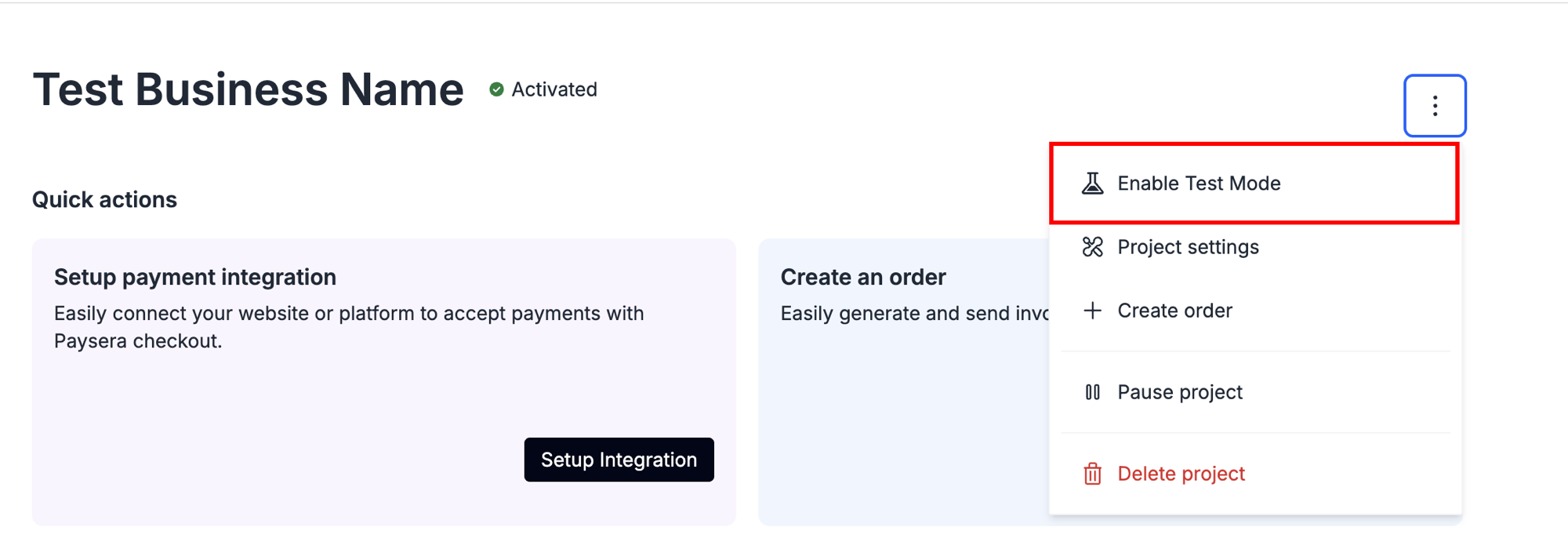
Enable Test Mode from the project actions menu
While Test Mode is on, the project is marked with a Test Mode tag, and a banner reminds you that no real money is collected. Payments that were already in progress when you switched finish and settle normally.
Test Mode can't be toggled while the project is paused, blocked, suspended or deleted.
You don't need to change your integration. Whether you use the API directly or one of our plugins, the test flag is applied automatically from the project's state — your existing code and configuration work unmodified. When a project is in Test Mode, the checkout simply offers the test payment options described below instead of live ones.
While a project is in Test Mode:
- No real money is moved. Test payments are excluded from settlements, payouts and reporting.
- Splits are not distributed. A test payment never produces a payout, so split legs and their
distribution.*events only occur in live — see Split Payments. - The payer sees a notice on the payment form: "This is a test payment. No real money will be deducted."
- Callbacks and status updates behave exactly as in live, so you can validate your webhook handling — test payments are additionally marked with an
is_testflag so you can tell them apart. - Emails are clearly marked. Any payer or merchant email generated by a test payment carries a
[TEST]prefix in the subject and a notice in the body.
Point your integration at your normal (test-mode) project and run real order flows against it. Because the flag comes from the project, nothing in your request needs to change.
Testing Non-Card Payments
For bank and other non-card methods, Test Mode offers a simulated payment method. On the simulator page you choose the outcome yourself — success or failure — and the corresponding status events and callbacks are fired, just as a real method would. This lets you exercise both your success and failure handling without a real bank.
Testing Card Payments
Card payments in Test Mode are processed in a genuine test card environment — so you enter card details on the normal payment form and get a real authorisation response.
Real cards will not work in Test Mode, and the test cards below will not work in live.
Test Card Numbers
Use any of these with expiry 03/2030 and CVC 737:
| Brand | Card type | Issuing country | Card number |
|---|---|---|---|
| Visa | Classic (consumer) | NL | 4111 1111 1111 1111 |
| Visa | Classic (consumer) | ES | 4988 4388 4388 4305 |
| Visa | Classic (consumer) | NL | 4166 6766 6766 6746 |
| Visa | Classic (consumer) | PL | 4646 4646 4646 4644 |
| Mastercard | Credit | GB | 5555 5555 5555 4444 |
| Mastercard | Consumer | NL | 5555 3412 4444 1115 |
| Mastercard | Consumer | GB | 5555 4444 3333 1111 |
| Mastercard | Credit | NL | 2223 0000 4841 0010 |
Any future expiry date and any 3-digit CVC are accepted; we recommend the values above for consistency.
Choosing the Payment Outcome
The card number does not determine whether a payment succeeds or fails — on their own, all the cards above are approved. To simulate a declined or failed payment, keep the same card details and enter one of the keywords below as the cardholder name:
| Cardholder name | Outcome |
|---|---|
| (any normal name) | Payment approved |
DECLINED | Payment refused |
CARD_EXPIRED | Refused — expired card |
INVALID_AMOUNT | Refused — invalid amount |
BLOCK_CARD | Refused — blocked card |
CVC_DECLINED | Refused — CVC declined |
ISSUER_UNAVAILABLE | Refused — issuer unavailable |
FRAUD | Refused — suspected fraud |
Example — simulate a declined card payment:
Card 4111 1111 1111 1111, expiry 03/2030, CVC 737, cardholder name DECLINED → the payer sees a refused payment, and your integration receives the corresponding failure status and callback.
The keyword must be entered exactly as shown (uppercase). Any other name is treated as a normal, approved payment.
Test Payment Rate Limit
Test payments are rate-limited to 60 payments per 60 minutes per project (fixed window). This is separate from the general API rate limit and applies when a payment is initiated on a test-mode project.
When the limit is exceeded, payment initiation fails with HTTP 429 Too Many Requests, error code rate_limit_exceeded, and a retry_after field telling you when the window resets. Note that retry_after here is a Unix timestamp (a point in time), unlike the general API rate limit's Retry-After header, which is a duration in seconds — don't sleep for retry_after seconds; wait until that time.
If you run automated test suites against a test-mode project, keep the total number of payments per run below the limit, or add throttling so a full run stays under 60 payments per hour.
Turning Test Mode Off
Open the same actions menu (⋮) next to the project name and choose Disable Test Mode, then confirm with Switch to Live. Live payments resume immediately, the test payment options disappear, and test data stays out of your settlements and reports.
Related Documentation
- Your First Payment - Complete end-to-end payment tutorial
- Environment - API configuration and endpoints
- Webhooks - Handle status change notifications
- Payment Statuses - All possible payment states